
A vehicle spec check is the first step to determine how you want your car. It gives you short descriptions of essential vehicle details, which are kept for display in a car dealership. But, if you buy a car online or need to confirm the vehicle details, a car spec check service is required.
When purchasing a vehicle, you must know the technical specifications and features of the car you’re interested in. With all this data, you can make an informed choice and determine if a vehicle fits you. In this article, we’ll delve into the details of a car spec check and why it’s an essential tool for car buyers.
Remember that a free VPN for Chrome service can provide extra security and privacy when researching vehicle specifications and histories online, open cross-border shopping options, and help you save on renting a car when travelling.
What does a car specification check show?
A car spec check is an online data report that reveals the vehicle’s specs. It includes vehicle make, model, fuel consumption, BHP power, performance, speed figures, road tax status, vehicle financial and environmental details and estimated running cost. Our vehicle spec check assists you in knowing the car and seeing if it is what you need.
A free car spec check by Reg lets you see specs for any car by just entering its registration. After inputting the vehicle registration, you can access the report instantly.
A vehicle spec check is handy for making an informed buying decision. For instance, the running cost per annum tells What budget you should set for the vehicle annually.
Similarly, if you aim to buy a fuel-efficient car, you can rely on the economic details in the specification check. You can also check car value to know its real worth.
How does this site work to check car specs by VIN?
We gather comprehensive car data to provide you with detailed information and history. Within seconds, you’ll gain a complete overview. Here’s how it works: enter the registration number, and we’ll display the vehicle information.
In addition to general details, you can opt for extra premium checks, including:
- Mileage
- Damage
- MOT history
- Write off history
- Theft check (Police info)
- Debt history on the vehicle
- Plate change
- Owner history
- General car information
Get a comprehensive vehicle data check for £ 9.95.
What information does the free report include?
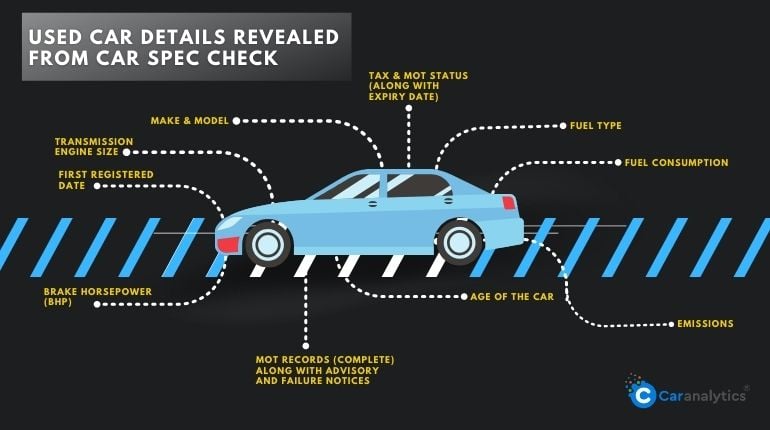
An accessible vehicle specification check report from different providers may render various details. We source data from the DVLA, DVSA, and VCA to provide a comprehensive report. As we fetch data from varied government sources, our free vehicle history check report offers more details than you would learn through a single source. Here’s a classification of what our free car spec report contains.
- DVLA: Imported, exported, scrapped, unscrapped, colour changes, plate changes, V5C issue date, etc. For a complete list of DVLA’s bulk data set, click here.
- DVSA: Past and present MOT test data with MOT passes, failures, advisory notices, and mileage history recorded during MOT tests.
- VCA: CO2 Emissions and Fuel Economy Data, and Vehicle Safety Branch Recalls Data.
You can either query the DVLA database here or our car spec finder. Both reports have almost the same information; however, with us, you will receive more insights into your vehicle, such as the vehicle running cost, mileage history, and performance data. The latter includes BHP check, top speed, power rpm, torque, etc.
All the data we provide will come in handy in making an informed car-buying decision. For example, a car’s performance data tells how much power it can generate and how fast it can go. A vehicle with a maximum speed of 110 km/h will not be suitable if you drive on a UK motorway daily.
We are among the most cost-effective providers for vehicle history checks. We offer a sample report of the deluxe check, allowing you to preview the included information before deciding if you require a full check.
What information can you get from the vehicle registration document?
It is a fact that checking the logbook while buying is a mandatory task. Because there are basic details registered from there, you can easily confirm the details acquired online. The information obtained from the registration document is as follows,
- Personal Details (Name & Address)
- Logbook Serial number
- Vehicle Identification Number (VIN)
- Vehicle details and specifications.
- Changes in the vehicle like colour, chassis or body shell (replaced or modified)
- Changes in Body type
- Chassis Number
There are chances where the seller intentionally tries to sell the car with the fake logbook or excuses the logbook is sent for a DVLA update. So, the buyer must check if the logbook is genuine to have a hassle-free purchase. Still, if you buy or sell a car online or need to confirm the vehicle details, a car spec check service is required.
Tip of the Topic: If the serial number is between BG8229501 and BG9999030 or BI2305501 and BI2800000, then the V5C might be stolen. So, you should contact the police when you can, or you can check in gov. uk.
The most valuable information on car specifications is found in our ‘Completed Background Checks.’ This feature serves as the core functionality of Car Analytics, providing an excellent solution for car buyers. Initiate a car spec check by starting with Car Analytics’ free car check.
Answering Your Questions
What spec is my car?
If you’re uncertain about your car’s specifications, enter the vehicle’s registration number into our Car Spec Check tool. Within 30 seconds, we can provide detailed information about your car’s specifications.
Can I get my car specs by reg plate?
Input your number plate details and get your car specification details instantly.
Can I check my car specs by VIN?
You don’t need to obtain the vehicle’s VIN you want to check. The car’s registration number is all we need to generate an instant specification report for you. Please enter this information into our Car Spec Check tool, and you’re ready. The VIN can track recalls, registrations, warranty claims, thefts, and insurance coverage.
Why should I use a car spec check?
Even if you’ve owned your car for several years, it’s common not to have its critical statistics memorized. While many details may be documented in past servicing, MOT records, and the owner’s handbook, checking these sources may only sometimes be convenient. There’s also the possibility of misplacing these critical documents.
No need to worry—our free and user-friendly tool can effortlessly handle checking any car’s details for you.
And remember, if you’re curious about the value of the vehicle you’ve checked, you can also use our free car valuation tool.